
A daily flashcard sheet · for iPhone and iPad
Spaced repetition, on paper.
Collect words on your phone. At the time you choose, Tobokachi builds a printable sheet with exactly the cards you're about to forget. Study it with a pen, rate each card back in the app, and FSRS plans the rest.
Pronunciar un discurso
Abschließen
jemanden kennenlernen
§ 02 — How it works
One sheet a day.
Five steps.
The app does the scheduling. You do the remembering, the way it sticks: by writing. Then you tell the app how it went, and tomorrow's sheet adapts.
- 01

Save words
From any app with the Share button, or right inside Tobokachi.
- 02

Make cards
A word and its translation, sorted into decks by topic.
- 03

Get the sheet
At your study time, FSRS picks only the cards due today and lays them out on a printable PDF.
- 04

Write
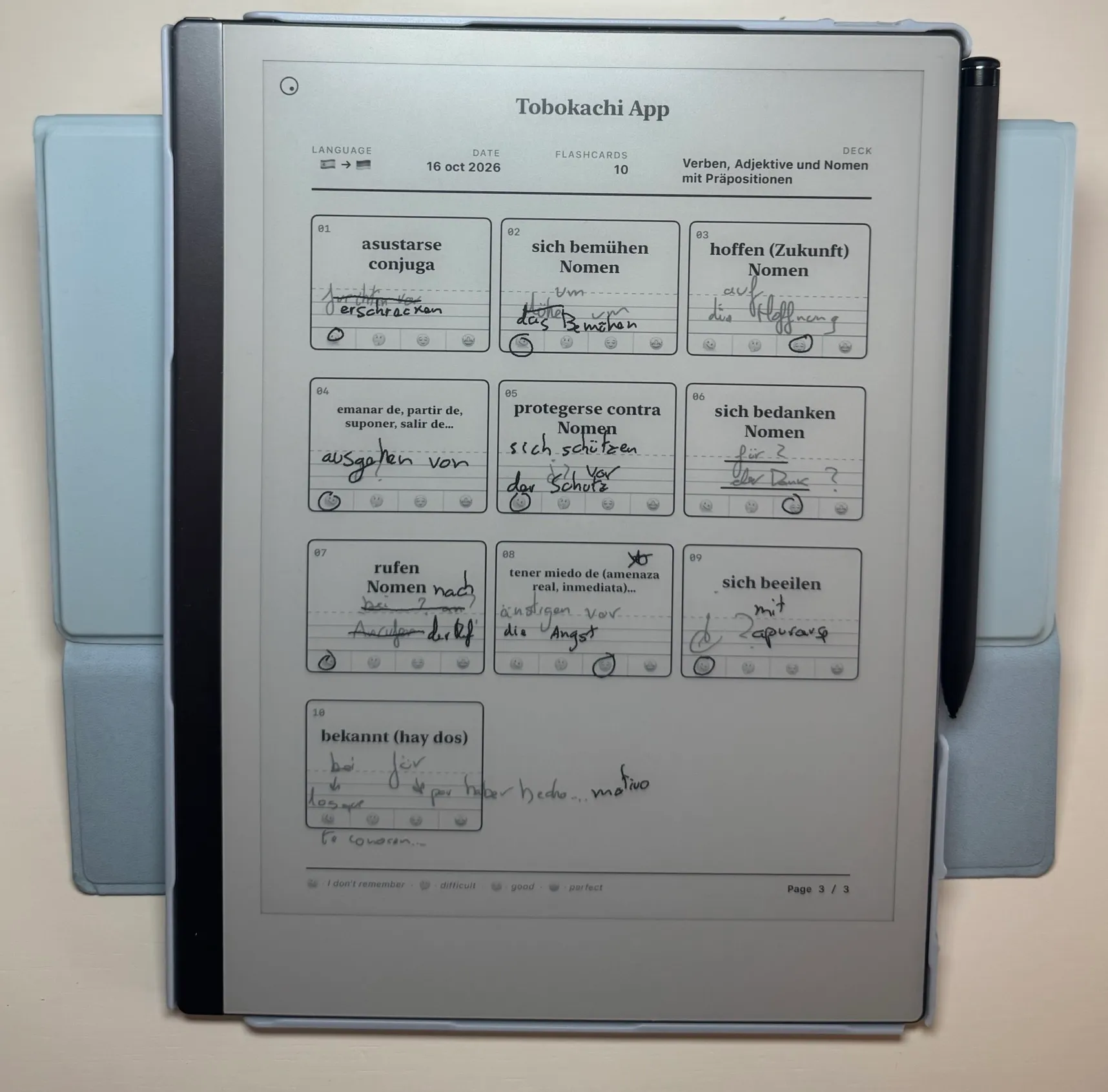
On paper, with Apple Pencil, or on your e-ink tablet. No screen, no notifications.
- 05

Rate it
§ 03 — Why paper
Writing is
remembering.
- 01
Recall, not recognition
To write a word you have to pull it out of your memory. Picking the right answer from a list only asks you to recognise it.
- 02
Nothing else on the page
A sheet of paper has no notifications, no streaks and no other app one swipe away.
- 03
A record you can see
Doubts, crossed-out words, corrections in red: the sheet shows what you really know, and the app turns your ratings into tomorrow's plan.
§ 04 — Inside the app
Everything for a
daily paper habit.
- 01
22 languages
Learning goals with your level and a daily limit for new cards and reviews.
- 02
Decks by topic
Irregular verbs, phrasal verbs, kanji, grammar: one deck for each thing you are working on.
- 03
FSRS scheduling
The modern open-source algorithm, also available in Anki, decides what goes on each sheet.
- 04
Printable PDFs
Clean A4 sheets with room to write, ready for any printer, iPad or e-ink tablet.
- 05
Daily reminder
A notification at your study time when the day's sheet is ready.
- 06
Save from anywhere
Share text from Safari or any other app straight into Tobokachi.
- 07
CSV import & export
Bring your cards from another app, or take them with you.
- 08
iCloud sync
Your decks on iPhone and iPad, synced through your own iCloud.
- 09
Private by design
No account, no ads, no tracking. Your cards stay on your devices and in your iCloud.
§ 05 — Questions
FAQ
Something else? Write to support →
Is Tobokachi free?
Yes. There are no ads, no subscriptions and no account to create.
Do I need a printer?
No. You can print the sheet, but you can also write on it with Apple Pencil on an iPad, or send it to an e-ink tablet.
Which e-ink tablets does it work with?
Any device that can open a PDF and let you write on it. Tobokachi creates a standard PDF that you can share or send to your tablet.
What is FSRS?
FSRS (Free Spaced Repetition Scheduler) is a modern algorithm that estimates when you are about to forget each card and schedules the review just before that moment. You only see the cards you need each day.
Why do I rate the cards in the app after studying on paper?
The rating is how FSRS learns how well you know each card. It takes a few seconds per sheet, and it is what makes tomorrow's sheet contain the right cards.
Which languages can I learn?
22 languages, including English, Spanish, German, French, Italian, Portuguese, Japanese, Chinese and Korean. The app interface is in English; your cards can be in any language.
Can I bring my cards from another app?
Yes. If your flashcard app can export a CSV file, you can import it into Tobokachi. You can also export your cards as CSV at any time.
What happens to my data?
Tobokachi collects no data. Your cards are stored on your device and synced through your own iCloud account.
